My Setup

Recently, I made the switch from Windows to Linux, and after a few weeks of toying around I believe I have gotten it to a place where everything has begun to look and feel natural to me. So, I decided now would be the perfect time to document and share my setup.
✨The Aesthetics✨
One of the most rewarding parts of switching to Linux was discovering how much more customizable the desktop environment was compared to Windows' limited options. With the freedom to tweak the desktop to my liking this is what I have come up with:

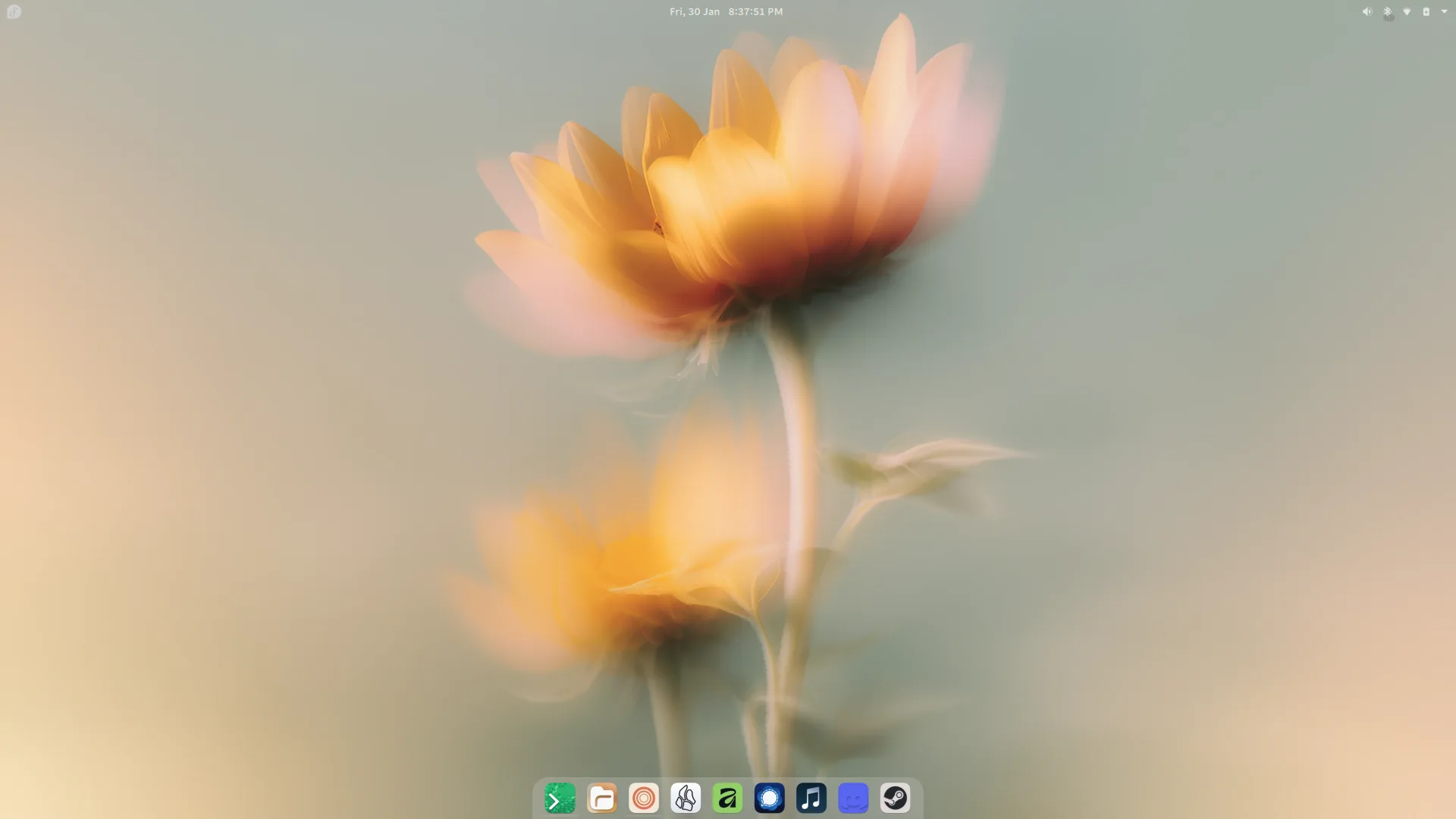
Basically, I tried to take my favorite things from Windows and MacOS and put them together.
The Wallpaper
I usually keep the same wallpaper for a long time, however I switched recently to a gorgeous wallpaper made by Basic Apple Guy as a part of his Floral wallpaper pack. Sunflower's are my favorite kind of flower so choosing this one was a no-brainer.
The Panels
I have two panels, a top MacOS style Panel and a bottom ChromeOS style panel. The underlying Plasma Style I use is Win10Sur-dark and both panels were made to look the way they do by using a widget called Panel Colorizer. I won't get into all the settings I messed with, but essentially I turned the top panel background invisible and applied a ChromeOS theme to the bottom panel. Both are available as presets within the Panel Colorizer settings.
In the top panel I have the following widgets in order from left to right. First is Kpple Menu - Customizable a MacOS style menu with useful quick settings. I swapped the default icon with a white fedora icon to match the linux distro I am using. After that, although you can't see it in the picture above, is a basic menu bar that comes with KDE Plasma. Then, I have the default digital clock widget that I used spacers to center, and edited to use the date and time format that I prefer. Finally, I have the system tray with my most used entries set to always show -- those being the volume, Bluetooth, WiFi, and battery controls.
The bottom panel includes my most used apps and that's it. Although, I have gone through and given each app its own custom designed icon.
The Apps
Terminal
My terminal app of choice is Ptyxis, I really like how customizable it is, but even out of the box I think it is the best looking terminal I have tried.

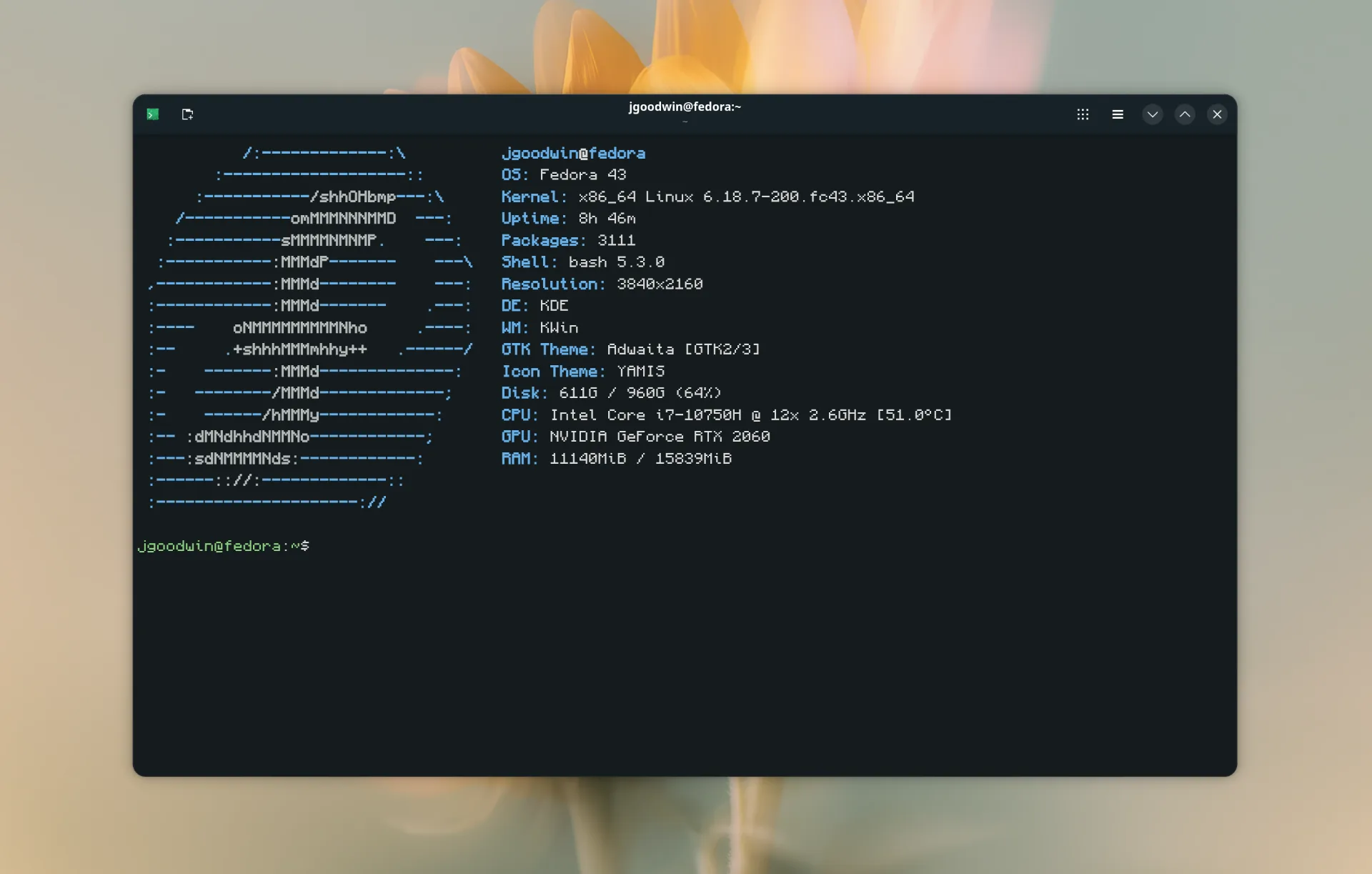
The color scheme I am using is Everblush, and the font is Monocraft 10.
File Manager
I use Dolphin, not much to say about it. It's the default option, and it works well enough. Apparently it is really customizable, but I haven't looked to much into it yet.
Web Browser
I could write a whole blog post about my relationship with web browsers (I probably will one of these days), but to keep things simple I use Zen. It is the best browser I have ever used, and it gets better every day.

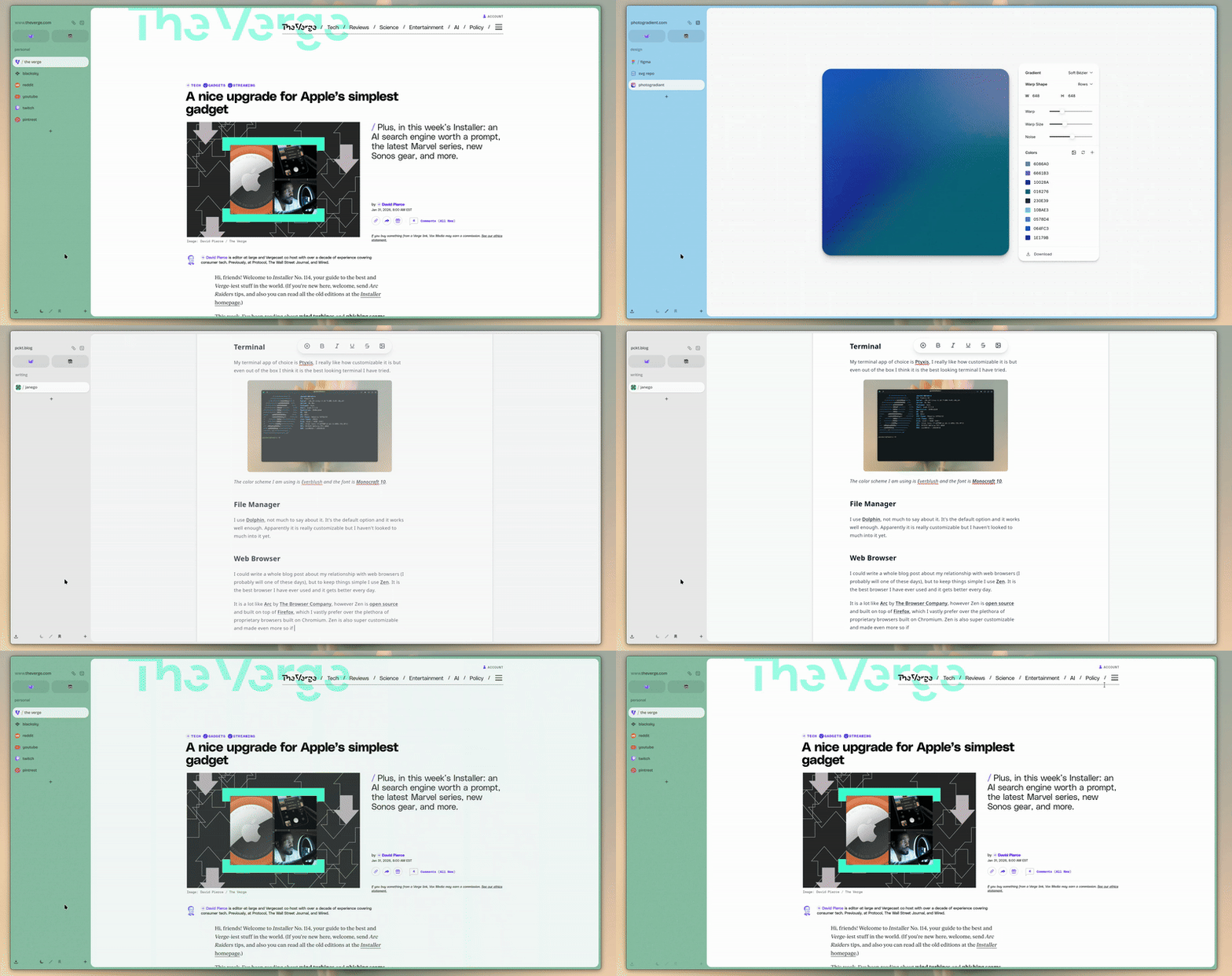
It is a lot like Arc by The Browser Company, however Zen is open source and built on top of Firefox, which I vastly prefer over the plethora of proprietary browsers built on Chromium. Zen is also super customizable and made even more so if you install the 3rd part mod store Sine.
I have three spaces, one for personal miscellaneous web browsing, one for design projects and resources, and one for writing. These are all usually changing, sometimes one will get merged with another or I'll make one for a specific project I am working on, it really just depends on my needs any given day.
Note Taking & Writing
My main note taking app is Obsidian. Almost everything I write lives there. I think the project is really cool, especially how it leverages local files so much in an age where it feels like we are putting everything in the cloud.
You can do a ton with Obsidian, and many people will talk about things like "Second Brains" or "Zettelkasten systems" or post giant webs of how all their notes connect to each other, and while all of that is cool I am content to just put notes into folders and that is about it.

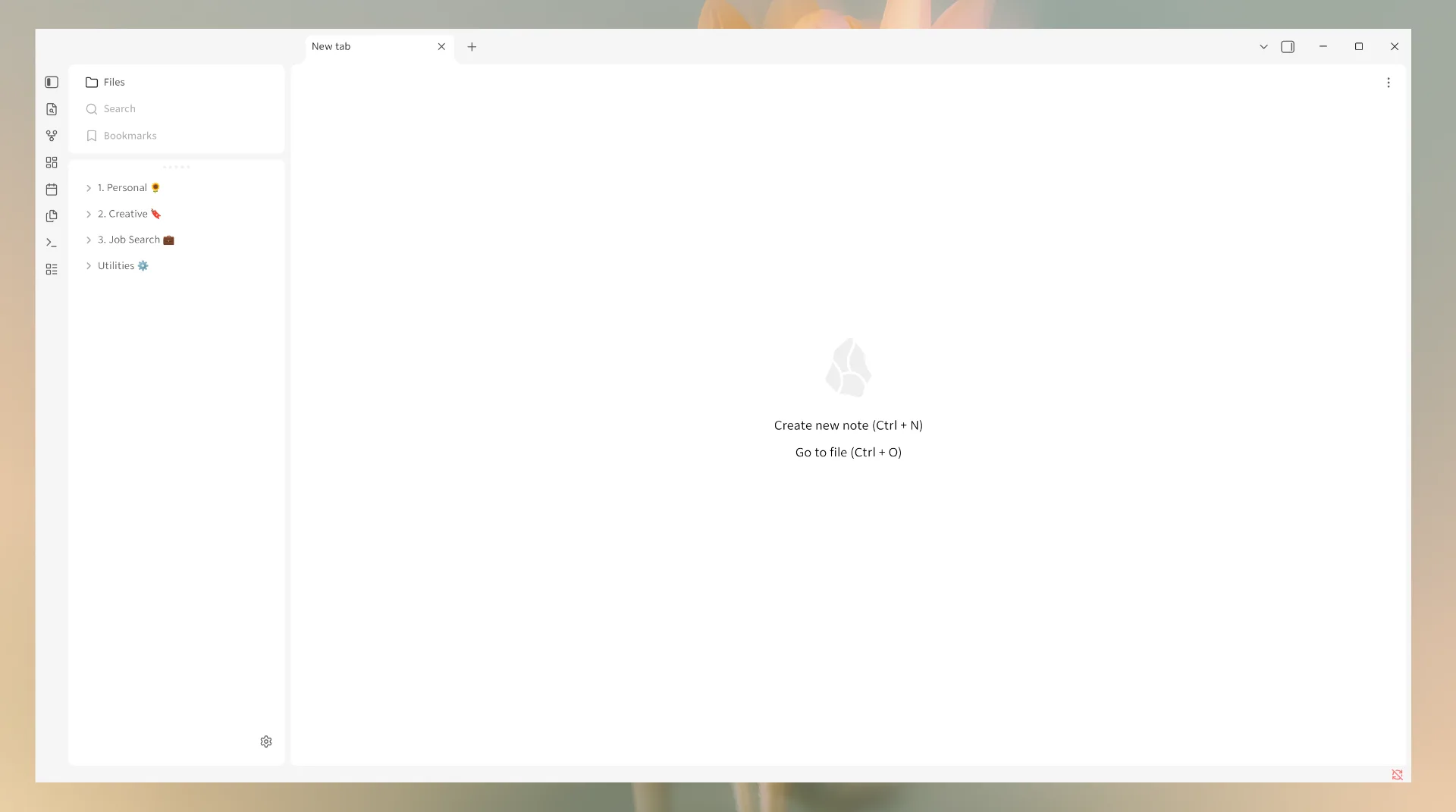
I am probably one of the dozen people who use the light theme in Obsidian
At the risk of repeating myself, I am also a big fan of how customizable it is. The current theme I am using is Baseline, and it is by far one of the cleanest and most polished I've ever seen.
My only hiccup I've run into with Obsidian is getting sync to work. Previously, I just used iCloud and that worked good enough, but since iCloud doesn't work with Linux natively I have to come up with some other way to sync my notes across devices.
Digital Editing
Currently, I am trying out the new Affinity app that Canva released for free. It doesn't have official Linux support but someone who goes by ryzendew made a really easy way to get it working. Previously, I mainly used Clip Studio Paint, but I have not gotten it to work nearly as well. I also use Figma within Zen.
Communication
I initially got Signal because of its security and privacy features but not enough people talk about how its actually a really handy app. It is even more secure than iMessage, but unlike iMessage it is on every platform so I can message my friends with iPhones or Androids from my Linux computer. Sure there are other apps that can do this like WhatsApp and Telegram, but those are, to put it bluntly, evil.
Music
Music streaming services are another topic that I can (and will) write more about, but having tried them all (and I mean all) Apple Music is the one I keep coming back to. Even before I owned a single Apple product I was listening to Apple Music on my OnePlus 7 Pro.
While I find Apple Music's Audio Quality, UI, and integration with the rest of the Apple ecosystem great, what really keeps me coming back to it is since it is built on iTunes I can add custom music and albums that aren't in Apple's Music catalog and have them sync across my devices.
In my experience, the only other streaming services that can do this are Spotify or using Roon and subscribing to a streaming service that integrates into it such as Tidal or Qobuz. Roon + Tidal would probably be my preferred way to do this if not for the fact that two music subscriptions in addition to setting up a dedicated Roon server is just cost prohibitively expensive in this economy.
In order to actually listen to Apple Music I am unfortunately stuck using the web app since Apple doesn't make a client for Linux. I used to use Cider which is a third party Apple Music client, but unfortunately, it appears the developers of Cider are pretty awful.
Discord and Steam
Finally, my last two most used apps are Discord and Steam. I have a group of friends from my hometown and we play games together and for that these are necessities. I find both work rather well on Linux. It is clear Valve has put a lot of work into making Steam be able to run Windows games on Linux although it still requires a bit more tinkering than I would like.
Wrapping Up
That just about wraps up where I have found myself as someone relatively new to Linux. However, I am sure I will continue to discover more useful apps and tweak things here and there and maybe when those add up enough I will make a follow up post.
And if you have any questions or comments feel free to reach out to me on Bluesky @janego.myatproto.social.